
Each piece of equipment that is being monitored by Critical Labs should have its own view. This makes it easier to diagnose problems that may arise with a particular piece of equipment. When creating an HVAC view, the following items are recommended to help you monitor your piece of equipment to the fullest:
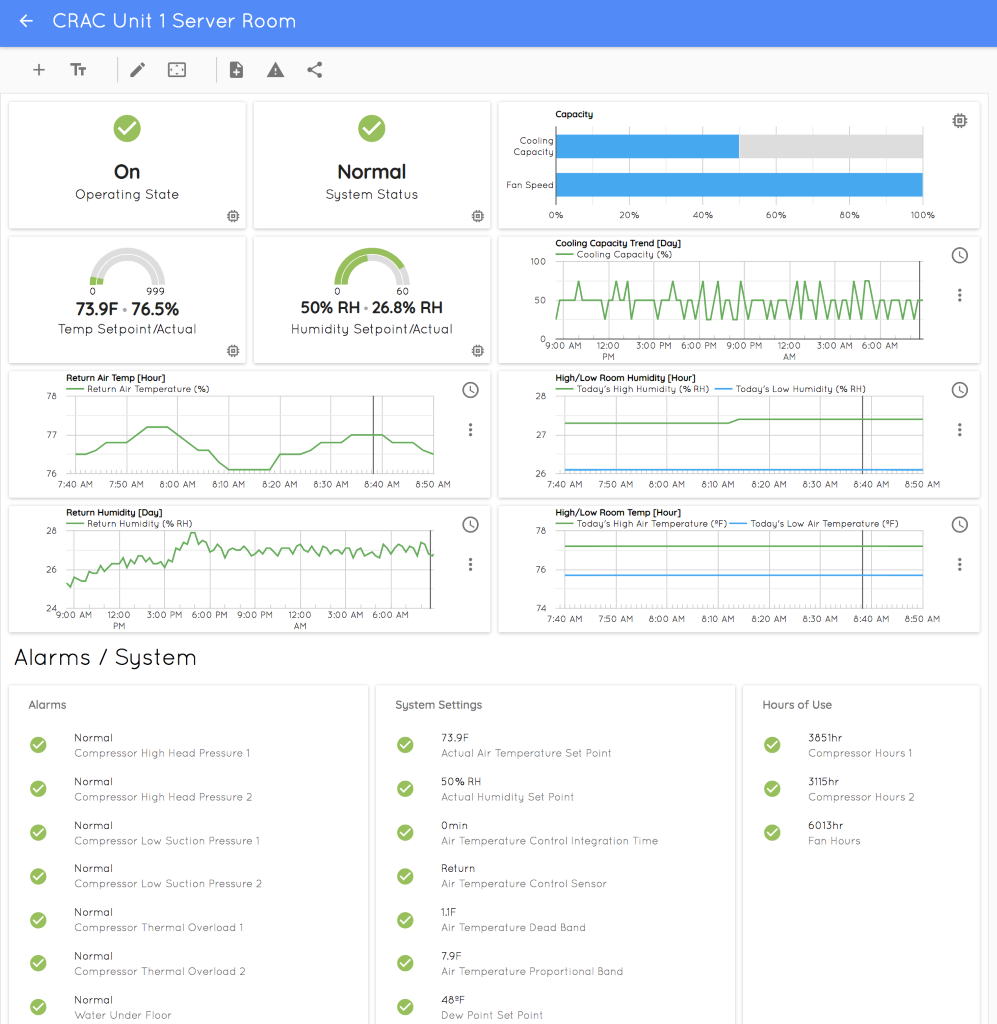
Summary Section (Top)
- Operating State
- System Status (Summary Alarm)
- Major Set Points
- Operating Status (percent cooling, fan speed)
Trends (Header Optional, trends are self-explanatory)
- Include the most important trend information. Limit trend charts to no more than 6-8 charts.
Alarms and System (Header)
- Box with Alarms (Limit alarms to 20 or less)
- Box with System Settings (limit settings to 10 or less)
- Information about the System (limit to 5 or less)
Example
Comments
0 comments
Please sign in to leave a comment.