
Critical Labs gateways can listen for SNMP traps to help you diagnose problems with your equipment. Learn more about SNMP traps and how Critical Labs uses them here.
To setup traps on a ServersCheck gateway, do the following:
Navigate to the ServersCheck web portal by entering the device's IP address into your web browser, and enter the login credentials.

Select SNMP under Sensor Menu on the right hand side of the page.
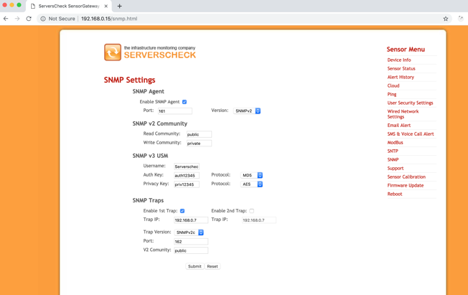
Under the SNMP Traps section:
- Select Enable 1st Trap
- Enter the Critical Labs gateway’s IP address for Trap IP (IP can be found on the gateway's information page in the web app)
- Select either SNMPv1 or SNMPv2c for Trap Version
- Enter 162 as the port
- Enter public as the community string
- Click Submit
Restart the ServersCheck gateway. Your ServersCheck should now be able to send traps to Critical Labs.
Comments
0 comments
Please sign in to leave a comment.